Product Initiation Document | Version 1.0
TABLE OF CONTENTS
- Product Initiation Document | Version 1.0
- Product Details
- Document Version Control
- Project Objective
- Product Description
- Diagram
- Product Scope
- Access Information & Postman Collection
- Data Mapping
- QA Business Cases
- Project Team
- Communication Plan
Product Details
Product Title | Tamara |
|---|---|
Start Date | 23-June-2024 |
Product Manager | Murtuza khan |
Document Version | V 1.0 |
Completion Date | 27-June-2024 |
Document Version Control
Version | Issue Date | Issued By | Notes |
1.0 | 24-06-2024 | Murtuza khan | User Guide |
Project Objective
The objective of the integration should achieve the following:
Providing an eco-system design allows the consumer to expand his business by engaging other platforms without impacting the deployed solution structure.
Eliminate the manual work to ensure having accurate impact figures from Any System to Tamara.
Product Description
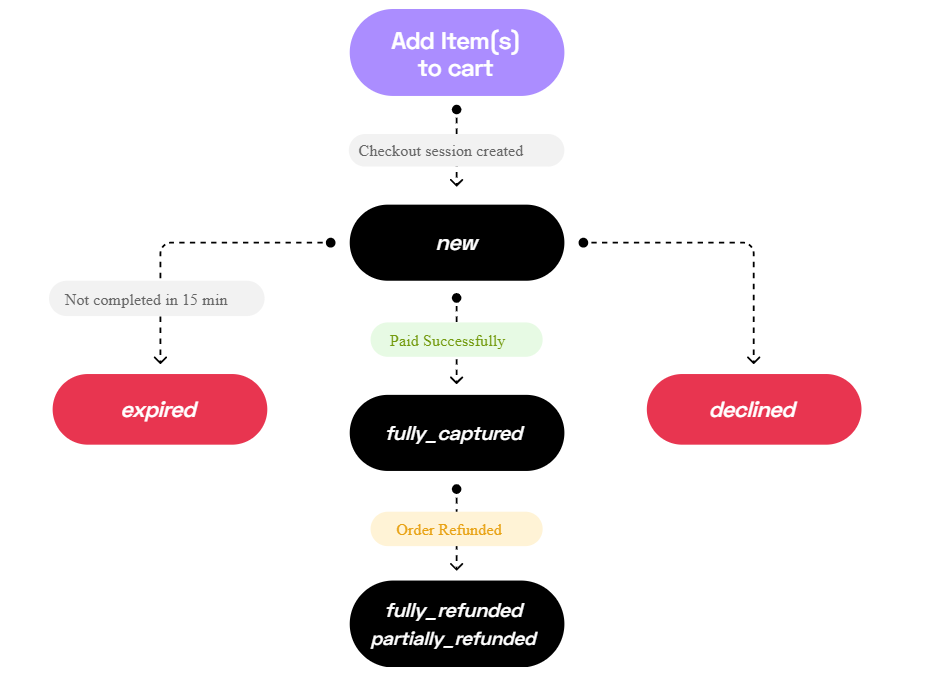
The Tamara online payment journey will always start with a customer adding items to their cart and heading to the checkout page to choose a payment method to use.
Tamara is a hassle-free, interest-free payment solution that has your best interests in mind!
How does it work?
Shop your favorite store, select your preferred Tamara payment plan, and split in up to 6 payments at checkout! You’ll pay a fraction of the cost now, and the rest over time according to your payment plan – no hidden fees or interest added to your total.
How many payment options does Tamara offer?
With Tamara’s hassle-free, convenient payment solutions, making smart financial decisions has never been easier!
Using Tamara, you can split your order total in up to 6 payments depending on the store you’re shopping at as well as your shopping history with Tamara. You can also make your full payment with Pay in Full, a payment solution that gives you the chance to make payments securely and safely, all while collecting cashback and enjoying buyer protection benefits.
Tamara’s payment solutions are fully Sharia compliant – we charge no late fees and no interest.
Diagram
Online Order Flow

In-Store Order Flow
Product Scope
There are two types of methods we can use in Tamara:
Online Checkout
In-Store Checkout
Online Checkout
Step 1. Check Payment Options Availability API
Before showing Tamara as a payment option, your server needs to check available payment types that you can avail as a merchant, and to check customer’s eligibility to use Tamara for the customer's total order value.
Endpoint
POST /checkout/payment-options-pre-check
The response of this API shows if there are any available payment options to the customer with the given order value, based on that, you can display Tamara as a payment method and allow the customer to pay using Tamara.
Step 2. Create Checkout Session API
Customer now sees Tamara as an available payment method on your store, and proceeds to choose it to checkout with,
When a customer decides to pay using Tamara and proceeds to checkout, your server needs to create a checkout session request to send the details of the purchase, such as the total amount to be paid using Tamara, currency, consumer information, item details and your unique order reference ID.
Considering the following parameters:
Consumer Details
Shipping Details
Amount
Tax
Discount
items
Description
Payment Types
instalments
Billing Address
Merchant URLs
Risk Assessment
Additional data
Endpoint
POST /checkout
The response of this API returns a unique Tamara
order_id,checkout_id,statusand acheckout_urlthat the user should be redirected to, to complete their transaction with Tamara.Order ID: This will be used for all subsequent operations, such as Authorize Order, Cancel Order, and Capture Order.
Checkout ID: For reference.
Checkout URL: This will redirect to the Tamara portal for login to authenticate with a mobile number. Furthermore, it will take you to the payment page where all information, including the amount, will be displayed to the end user. They need to select the payment method and process the payment. After a successful payment, it will redirect to the merchant URL defined in the payload.
Status: Example order status is "New."
We need to save the
Order IDandCheckout IDin our databases.
Step 3. Customer Journey
Our server will then redirect the customer to the checkout_url received in the above step to complete their Tamara checkout experience.
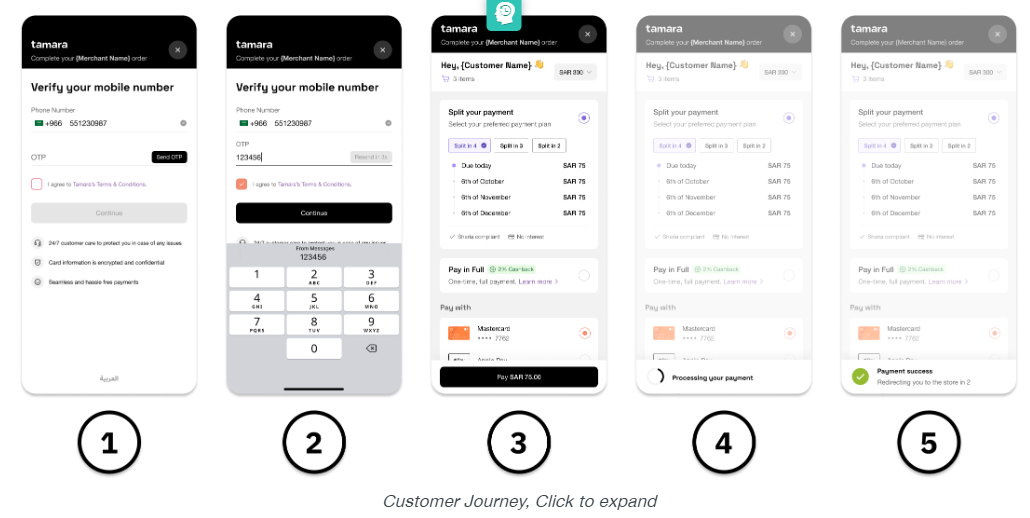
The customer will then be redirected to our website via the respective redirect URLs that were provided under the merchant_url object in your checkout session request.
Tamara will also send a notification payload for approved status change by POST method, to the Webhook URL that we registered on Tamara partner portal
Step 4. Authorize Order API
After receiving the approved webhook notification in the previous step, i.e., once the order status is on approved state in the checkout flow, our server would need to call back Tamara to confirm the receipt of the approved notification by authorizing the order/transaction, by replacing {order_id} in the endpoint path with the Tamara order_id we got from response of the Create Checkout Session API.
Endpoint
POST /orders/{order_id}/authorise
Step 4 Cancel API (Optional)
If, for any valid reason, the customer wishes to not continue with receiving his order after order has been paid using Tamara and authorized by the merchant, OR wishes to remove some items from his order, then you can initiate a Cancel Order Request which works to do exactly the 2 scenarios mentioned.
Either completely cancel the order OR update the order and remove the items that are no longer needed by the customer from the original order.
Endpoint
POST /orders/{order_id}/cancel
Step 5. Capture Order API
After authorizing, and once the order is shipped/fulfilled, our server would then need to send a capture request for the payment.
Note : Orders NOT captured are NOT settled to your account!
Endpoint
POST /payments/capture
Once the partially_captured or fully_captured state is reached, you can consider the amounts captured to be added to your next settlement cycle.
Optional Steps
Optional: Simplified Refund API
Based on your returns and refunds policies, after shipping/capturing, if a customer wishes to return the items or requests a refund, your server would need to send a refund request to Tamara
Endpoint
POST /payments/simplified-refund/{orderId}
Once the fully_refunded or partially_refunded state is reached, you can consider the amount to have been refunded by Tamara to the customer's card right away, and the refunded amount will be deducted from your next settlement.
Refund transactions are processed in real-time on Tamara's end but,
Refunds might take several hours to several days to reflect on the customer's bank account depending on the customer's bank's processing time.
In-store Checkout
This method helps you to offer Tamara to your in-store customers, either via non-integrated solutions such as the Web Interface Solution and Merchant Application or via an integrated solution through your directly integrating your in-store POS terminal.
Step 1: Add items to cart and choose Tamara as a payment method
When a customer decides to pay through Tamara, our server would need to create an in-store checkout session by using the Create In-store Checkout Session API that sends customer an SMS with checkout URL/payment link.
Endpoint
POST /checkout/in-store-session
The response of this API returns a unique order_id and a checkout_id for completing the transaction. Note: Please store them as we will need them in the next steps.
Step 2: SMS is sent to the customer and opened by customer on their phone
Order is now in the new state at Tamara, this checkout session expires in 15 mins by default and can be voided using our Void Checkout Session API, if needed.
Step 3: Check status of the order via Push or Pull methods
To identify and confirm that the customer has paid their first installment successfully, you will need to use any of the following methods to check:
Check the order status via the APIs every 5-10 seconds until you get fully_captured
Endpoint
POST orders/{order_id}
Or
Registering a Webhook URL (Push Method)
In order to receive real-time updates from Tamara for every status change that happens on your orders, we are encouraged to register a notification webhook URL with Tamara either using our Register Webhook URL API.
Step 4. Customer wants to return items or requested a refund
Based on our policy, if the customer requests for return, you can fully/partially refund the order using the Refund API
Endpoint
POST /payments/simplified-refund/{order_id}
Replace the {order_id} with the unique Tamara order_id from the response of the creation of the in-store checkout session and the amount that needs to be refunded as well as a comment for future reference.
Optional Steps
Optional: Check customer ID verification/onboarding status
To further optimize the checkout time, you can the implement Customer's ID Verification Status API , to determine whether or not the customer has completed the onboarding previously.
Endpoint
POST /merchants/customer/id-verification-status
While sending phone_number and country_code as query parameters.
Endpoint
POST /merchants/customer/id-verification-status
Access Information & Postman Collection
Tamara
URL :  Tamara - Partners Portal
Username: ajallabi@reachware.com
Password : Reach@2024
Tamara Documentation :  Get to know Tamara
API Token: eyJ0eXAiOiJKV1QiLCJhbGciOiJSUzI1NiJ9.eyJhY2NvdW50SWQiOiJlMTc1MzQwOC03MjdlLTRjNTEtYmM2OS1lN2M0ZTM2NjkyNjYiLCJ0eXBlIjoibWVyY2hhbnQiLCJzYWx0IjoiMDIwMDJjODZiN2RhNGQzMGY4OWI1ZDgyZGUwNzM0YTkiLCJyb2xlcyI6WyJST0xFX01FUkNIQU5UIl0sImlhdCI6MTcwMjkwNjQ2NSwiaXNzIjoiVGFtYXJhIn0.CgFLVukGBCBILSNCKNp27ewFs_rF2-Wjh7bi2NVJwvMqJRR1u8tirxLR-4QTxP3dE9Qd7pZTk-CGQB8KF-wn1dhaHz-Oh8x5zlELlP95e_uPvPrwHkRtRqkagw7G30WDMwMIdDSA9LFFHq4ilPXi8miR4ncCwUy0fp5OZ9CO9KbEFW17c448LCc7An7bSxilNOlrOwdOcUgiovRrXtMmnFoamcmHXoJpmXTxxpNjspiGGSNhZZA8-PP7gNna1kXMeR-FTGAdL2Qw4y_wK-wY3DcfDSRHREnLjyiJWq-LIRWhg8Sb15IcXy3eAVtvMf7HajESvsl3NSnjQ24gRrot9w
You can authenticate with our API by providing the above API token in the request Authorization header. Authorization: Bearer your_token
Notification token: 3a06bca3-4a9c-44d1-bdf5-6d6d848575b5
We use a Notification token to authenticate back when sending our notification data to your webhook URL. This JWT token will be attached to the webhook/notification endpoint as a query parameter called tamara Token. In order to validate this token, please use JWT decode with the HS256 algorithm and your given notification token.
Public Key: f91fb285-593d-464c-b4fe-d9716702fc97
*Check file below
Data Mapping
Online CheckOut
Create Checkout Session
Flow Description | This endpoint facilitates the creation of a checkout session, where all payment information is sent within the request to enable customer payments via Tamara. The response will include Please store the | |
Endpoint URL: | POST https://https://api-sandbox.tamara.co.tamara.co/checkout | |
Schedule | Event | |
Field/Solution | Tamara | Additional Info |
Total Amount |
| Required |
Currency |
| Required |
Shipping Amount |
| Required |
Currency |
| Required |
Tax Amount |
| Required |
Currency |
| Required |
order reference id |
| Required |
order number |
| Optional |
discount amount |
| Required |
discount currency |
| Required |
discount name |
| Required |
item name |
| Required |
items reference id |
| Required |
items sku |
| Required |
items quantity |
| Required |
items discount amount |
| Required |
items: discount currency |
| Required |
items: tax currency |
| Required |
items: tax amount: currency |
| Required |
items: unit price currency |
| Required |
items: unit price currency |
| Required |
items: total amount currency |
| Required |
items: total amount currency |
| Required |
items: consumer email |
| Required |
consumer firstname |
| Required |
Last name |
| Required |
Phone number |
| Required |
country code |
| Required |
description |
| Required |
merchant URL |
| Required Object |
Payment type |
| Required |
instalments |
| Required |
billing address |
| Optional Object |
shipping address |
| Required Object |
platform |
| Optional |
mobile | is_mobile | Optional |
locale | locale | Optional |
Risk assessment |
| Optional Object |
Authorize Order
Flow Description | This endpoint plays a crucial role in the online checkout flow and should be executed upon receipt of the | |
Endpoint URL | POST https://{URL}.tamara.co/orders/{order_id}/authorise | |
Trigger | On Event | |
Field/Solution | Tamara | Additional Info |
Order Id |
| Required |
Cancel Order
Flow Description | This endpoint is requested to cancel or update the total order amount while order status on | |
Endpoint URL | POST https://{URL}.tamara.co/orders/{order_id}/cancel | |
Trigger | On Event | |
Field/Solution | Tamara | Additional Info |
Order Id |
| status |
Capture Order
Flow Description | This endpoint is requested to perform a full or partial capture of the order, confirming the fulfillment or shipment of the items to the customer. The order status value will be | |
Endpoint URL | POST https://{URL}.tamara.co/payments/capture | |
Trigger | On Event | |
Field/Solution | Tamara | Additional Info |
Order Id |
| Required |
Total Amount |
| Required |
Currency |
| Required |
Item name |
| Required |
items reference id |
| Required |
items sku |
| Required |
items quantity |
| Required |
items discount amount |
| Required |
items: discount currency |
| Required |
items: tax currency |
| Required |
items: tax amount: currency |
| Required |
items: unit price currency |
| Required |
items: unit price currency |
| Required |
items: total amount currency |
| Required |
items: total amount currency |
| Required |
discount amount |
| Optional |
discount currency |
| Optional |
Shipping Amount |
| Optional |
Currency |
| Optional |
Tax Amount |
| Optional |
Currency |
| Optional |
QA Business Cases
Test Case | Description | Notes | Passed |
|
|
|
|
|
|
|
|
Project Team
Name | Role | Company | Communication |
Hamza Abu Sitta | Project Executive | Reachware | |
Ahmad Jallabi | VP of Product | Reachware | |
Murtuza Khan | Software Developer | Reachware |
Communication Plan
Meeting Frequency | Bi-Daily Progress Meeting |
Official Communication | Email, reachware Support Center, MOM. |
Shared task Management Tool | Smartsheet |
Contact Information
Reachware Integration: integration@reachware.com
Company Office
Riyadh, Saudi Arabia Call: + 966 9200 33605
Email: info@reachware.com Website:  Reachware - Leading IPaaS in the Middle East - Seamless System Integration
Service & Support
Email: support@reachware.com Call: +966 9200 33605
Was this article helpful?
That’s Great!
Thank you for your feedback
Sorry! We couldn't be helpful
Thank you for your feedback
Feedback sent
We appreciate your effort and will try to fix the article