API Key Authentication is a simple and effective way to control access to APIs. An API key is a unique identifier (usually a long alphanumeric string) that a client includes in requests to verify their identity.
It works like a password — when a client (e.g., mobile app, backend service) sends a request, it includes the API key in:
- the request header (recommended),
- the query string, or
- the body.
Common Use Cases:
- Public APIs: Weather data, maps (like Google Maps API), payment gateways, etc.
- Internal Microservices: To restrict access between services.
- Third-party Integrations: Allowing external systems to safely connect to your platform.
- Analytics and Monitoring Tools: To identify who is making requests and track usage.
Getting an API Key
Usually, you:
- Register on the platform offering the API.
- Create an API project or app.
- The platform gives you a unique API key.
How to Use It?
Usually, you:
- Register on the platform offering the API.
- Create an API project or app.
- The platform gives you a unique API key.
You typically include the API key in one of these ways
You Typically include the API key in one of these ways.
A. In HTTP Headers (Recommended):
GET /v1/data HTTP/1.1
Host: api.example.com
Authorization: ApiKey YOUR_API_KEY
Or
x-api-key: YOUR_API_KEY
B. In the Query String (Less Secure):
https://api.example.com/v1/data?apikey=YOUR_API_KEY
C. In the Body (for POST requests):
{
"data": "value",
"apikey": "YOUR_API_KEY"
}
How to Add a New System?
- Navigate to "System"
Go to "Add New System". - Add API Key in Headers
In the Headers section, add a new key-value pair:- Key: your header key (e.g.,
x-api-keyorAuthorization) - Value:
{{authentication_keys}}
- Key: your header key (e.g.,
Click Save to apply your configuration.
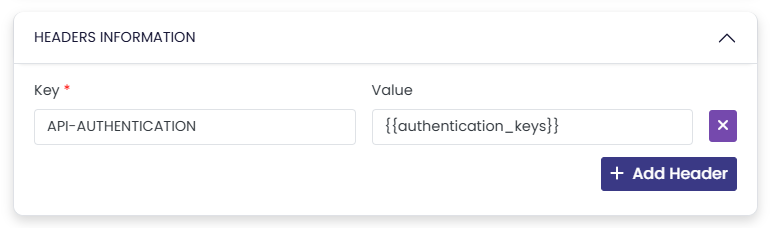
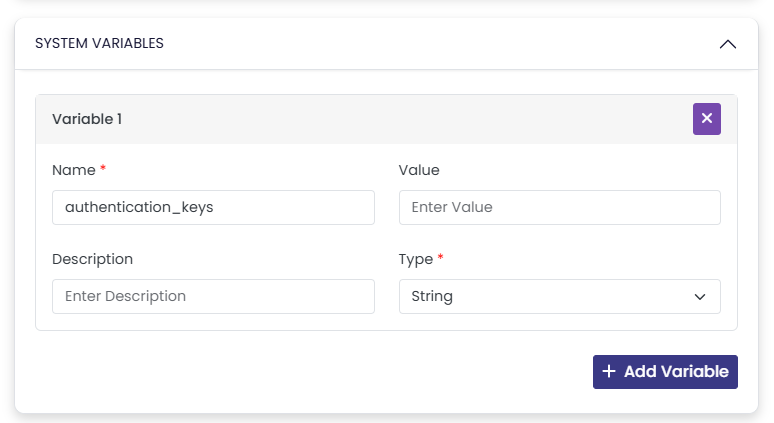
Using
{{}} lets you define the API key as a variable, enabling easy reuse across multiple clients.Set the Variable
Go to the "Variables" section and you can define the actual value for
authentication_keys on this section or define it on the Connection to ensure you can use the same system across multiple clients.Related Topics
Was this article helpful?
That’s Great!
Thank you for your feedback
Sorry! We couldn't be helpful
Thank you for your feedback
Feedback sent
We appreciate your effort and will try to fix the article