Mapping is the process of linking and aligning data fields between two systems—typically from a source system (System A) to a destination system (System B).
In the context of a Flow in Reachware, mapping ensures that each field from the source system is correctly matched to the appropriate field in the destination system. This is essential for accurate data transformation and seamless integration.
Think of mapping as a translator:
“Take this field from System A and place it into this corresponding field in System B.”Why is Mapping Important?
✅ Maintains data consistency between systems
✅ Ensures accurate data transformation
✅ Provides flexibility in how fields are aligned
✅ Enables automation, reducing manual intervention
Using Query Parameters in a Flow
Remember when you created the operation, you may have defined some parameters to be used in the Flow.
Here’s how to use them in the Flow Template:
From Flow Templet Go to the source system in your flow and click the Mapping icon.
This will open a new popup window (prompt screen) where you can configure the parameters.
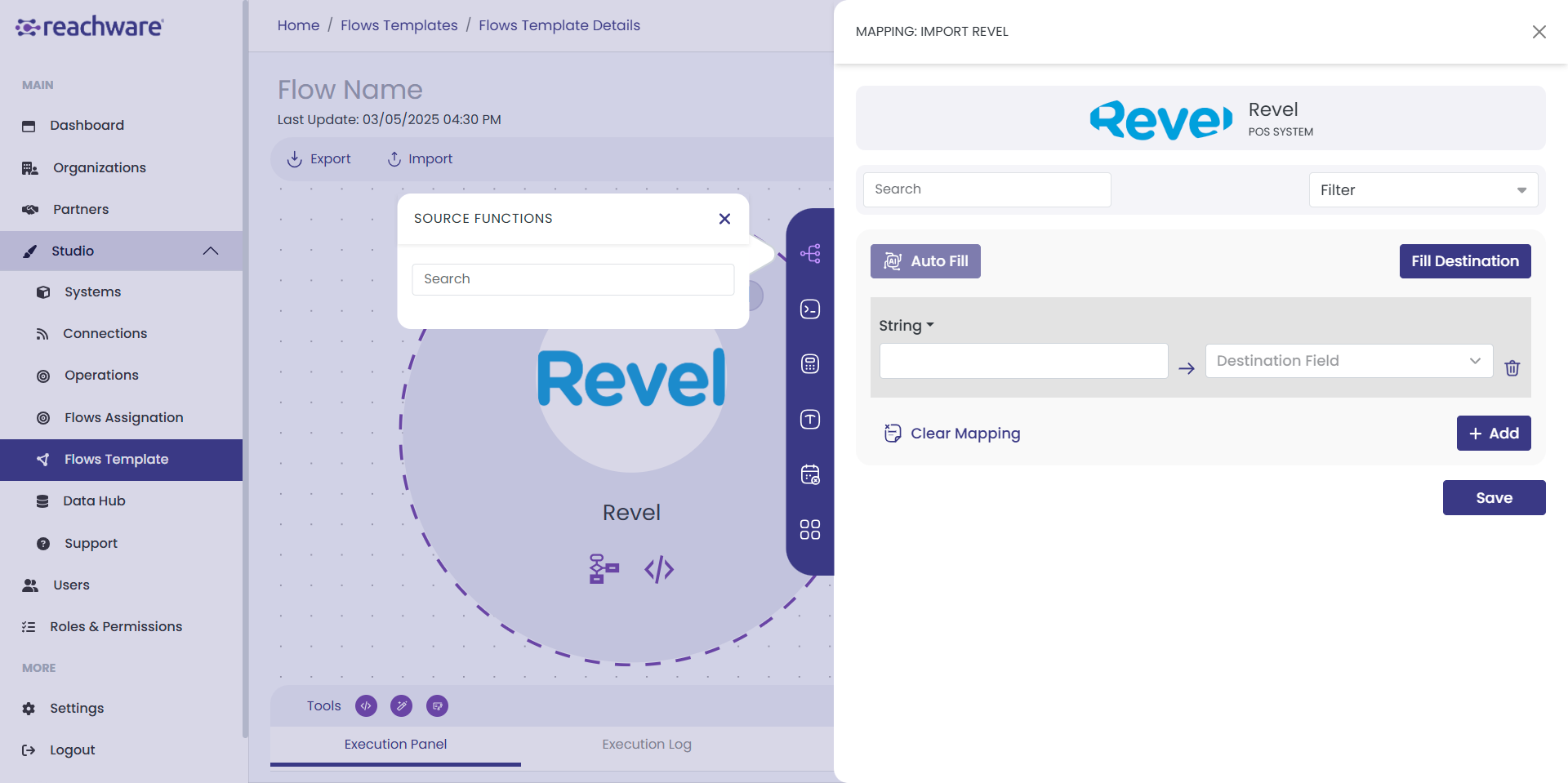
In this window, you will find multiple configuration options. Let’s start with:
Fill Destination Button
Clicking this button will auto-fill the parameter fields with those you defined earlier when creating the operation.
By default, the values from the Operation setup will appear if you saved initial value.
You can then edit those values and enter the desired input as needed.
Auto Fill
Clicking this button will auto-fill the parameter fields with those you defined earlier when creating the operation.
Clear Mapping
Removes all existing field mappings between the source and target data structures.

Click Save to apply your configuration.
Related Topics
Was this article helpful?
That’s Great!
Thank you for your feedback
Sorry! We couldn't be helpful
Thank you for your feedback
Feedback sent
We appreciate your effort and will try to fix the article